Examples
These examples illustrate how to use the CBR-FoX library across different datasets and scenarios, showing the full workflow from loading data to visualization.
Bitcoin Prediction
1. Import Necessary Libraries
Import required modules and libraries
from cbr_fox.builder.cbr_fox_builder import cbr_fox_builder
from cbr_fox.core import cbr_fox
from cbr_fox.custom_distance.cci_distance import cci_distance
import numpy as np
2. Load the Saved Data
Load preprocessed Bitcoin prediction data from a npz file
data = np.load("../examples/Bitcoin_prediction/Bitcoin_Prediction.npz")
3. Retrieve Variables from the Data
Extract relevant variables for model training and prediction
training_windows = data['training_windows']
forecasted_window = data['forecasted_window']
target_training_windows = data['target_training_windows']
windowsLen = data['windowsLen'].item()  # Extract single value
componentsLen = data['componentsLen'].item()
windowLen = data['windowLen'].item()
prediction = data['prediction']
4. Define CBR-FoX Techniques
Set up the CBR-FoX techniques using a custom distance metric
techniques = [
    cbr_fox.cbr_fox(metric=cci_distance, kwargs={"punishedSumFactor": 0.5})
]
5. Build and Train the CBR-FoX Model
Initialize the model builder and train on the loaded data
p = cbr_fox_builder(techniques)
p.fit(training_windows = training_windows,
      target_training_windows = target_training_windows,
      forecasted_window = forecasted_window)
Sample output from the model training process
2025-08-27 12:56:19,487 - INFO - Analizando conjunto de datos
...
2025-08-27 12:56:21,055 - INFO - Análisis finalizado
6. Make Predictions
Generate predictions and obtain explanations for the forecasted data
p.predict(prediction = prediction, num_cases=3)
Sample terminal output showing prediction report
2025-08-27 12:56:23,598 - INFO - Generando reporte de análisis
7. Visualize Results
Visualize predictions using a line plot with scatter markers
p.visualize_pyplot(
    fmt = '--d',
    scatter_params={"s": 50},
    xtick_rotation=50,
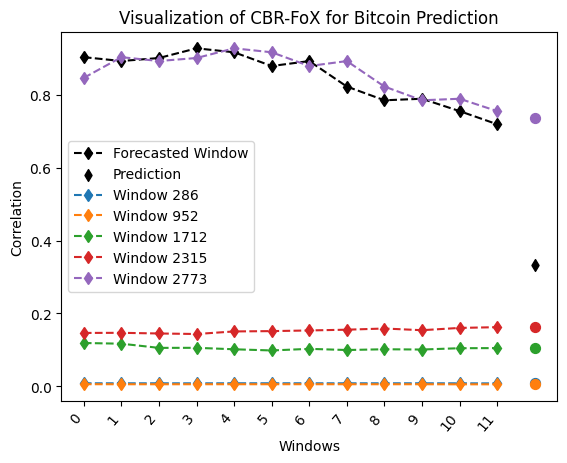
    title="Bitcoin Prediction",
    xlabel="Time",
    ylabel="Value"
)
Walmart Sales Prediction
1. Load the Saved Data
Load Walmart sales data from a npz file
data = np.load("Walmart_Sales.npz")
2. Retrieve Variables from the Data
Extract variables required for training and forecasting
training_windows = data['training_windows']
forecasted_window = data['forecasted_window']
target_training_windows = data['target_training_windows']
windowsLen = data['windowsLen'].item()
componentsLen = data['componentsLen'].item()
windowLen = data['windowLen'].item()
prediction = data['prediction']
3. Define CBR-FoX Techniques
Set up CBR-FoX technique with CCI distance metric
techniques = [
    cbr_fox.cbr_fox(metric=cci_distance, kwargs={"punishedSumFactor": 0.5})
]
4. Build and Train the CBR-FoX Model
Initialize the model builder and train on Walmart data
p = cbr_fox_builder(techniques)
p.fit(training_windows = training_windows,
      target_training_windows = target_training_windows,
      forecasted_window = forecasted_window)
5. Make Predictions
Generate predictions for Walmart sales
p.predict(prediction = prediction, num_cases=3)
6. Visualize Results
Plot Walmart Sales predictions with customized markers
p.visualize_pyplot(
    fmt = '-.',
    legend = False,
    scatter_params={"s": 25},
    xtick_rotation=50,
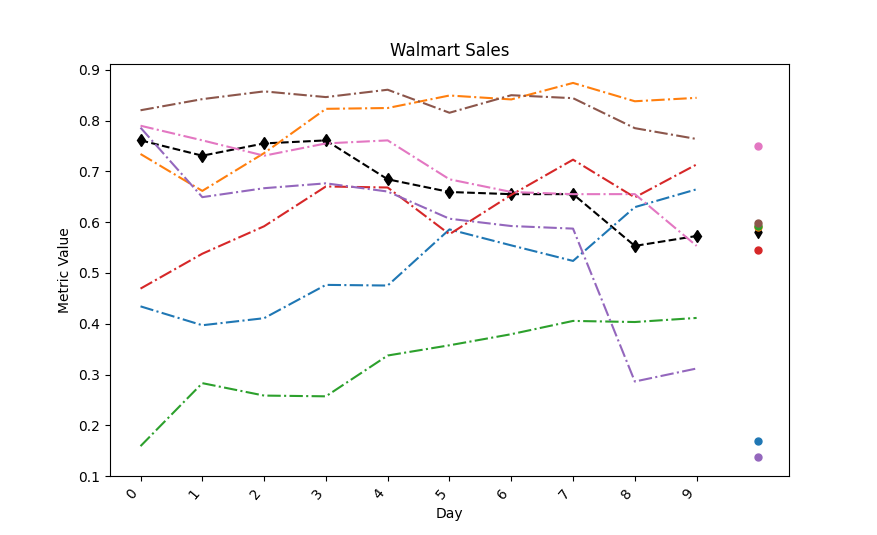
    title="Walmart Sales",
    xlabel="Day",
    ylabel="Metric Value"
)
Romania Power Usage Prediction
1. Load the Saved Data
Load Romania Power Usage dataset from 2016-2020
data = np.load("Romania_Power_Usage_Analysis_2016_2020_CBR-FoX.npz")
2. Retrieve Variables from the Data
Extract training and prediction variables
training_windows = data['training_windows']
forecasted_window = data['forecasted_window']
target_training_windows = data['target_training_windows']
windowsLen = data['windowsLen'].item()
componentsLen = data['componentsLen'].item()
windowLen = data['windowLen'].item()
prediction = data['prediction']
3. Define CBR-FoX Techniques
Define multiple techniques with different punishedSumFactor values
techniques = [
    cbr_fox.cbr_fox(metric=cci_distance, kwargs={"punishedSumFactor":0.5}),
    cbr_fox.cbr_fox(metric=cci_distance, kwargs={"punishedSumFactor":0.7})
]
4. Build and Train the CBR-FoX Model
Train the model with multiple techniques on Romania dataset
p = cbr_fox_builder(techniques)
p.fit(training_windows = training_windows,
      target_training_windows = target_training_windows.reshape(-1,1),
      forecasted_window = forecasted_window)
5. Make Predictions
Generate predictions with 5 forecast cases
p.predict(prediction = prediction, num_cases=5)
6. Visualize Results
Visualize predictions with line plot and scatter markers
p.visualize_pyplot(
    fmt = '--d',
    scatter_params={"s": 50},
    xtick_rotation=50,
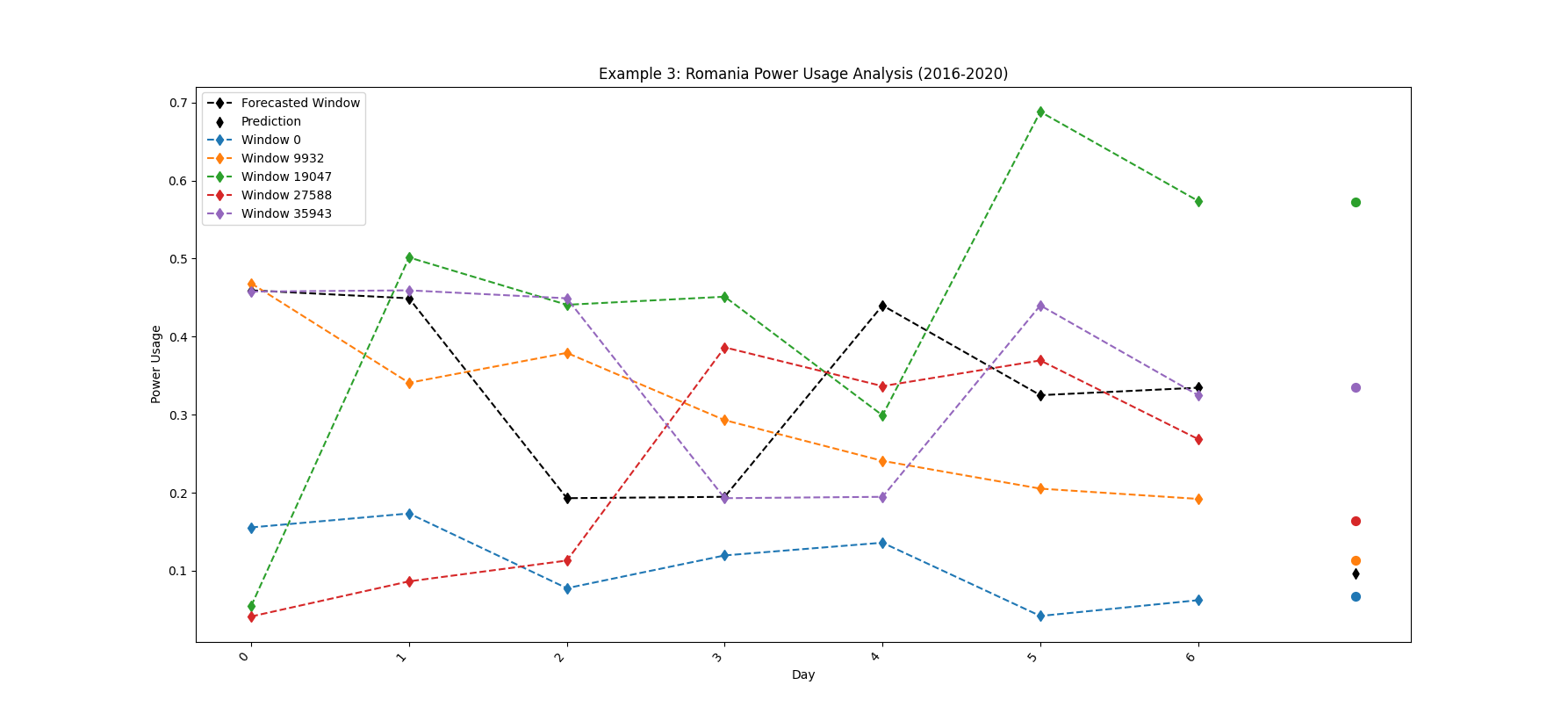
    title="Romania Power Usage",
    xlabel="Time",
    ylabel="Value"
)
Rainfall Prediction
1. Load the Saved Data
Load Rainfall prediction dataset from npz file
data = np.load("Rainfall_Prediction.npz")
2. Retrieve Variables from the Data
Extract variables for model training and forecasting
training_windows = data['training_windows']
forecasted_window = data['forecasted_window']
target_training_windows = data['target_training_windows']
windowsLen = data['windowsLen'].item()
componentsLen = data['componentsLen'].item()
windowLen = data['windowLen'].item()
prediction = data['prediction']
3. Define CBR-FoX Techniques
Set up CBR-FoX technique using CCI distance metric
techniques = [
    cbr_fox.cbr_fox(metric=cci_distance, kwargs={"punishedSumFactor": 0.5})
]
4. Build and Train the CBR-FoX Model
Initialize the builder and train the model on rainfall data
p = cbr_fox_builder(techniques)
p.fit(training_windows = training_windows,
      target_training_windows = target_training_windows,
      forecasted_window = forecasted_window)
5. Make Predictions
Generate rainfall predictions with 3 forecast cases
p.predict(prediction = prediction, num_cases=3)
6. Visualize Results
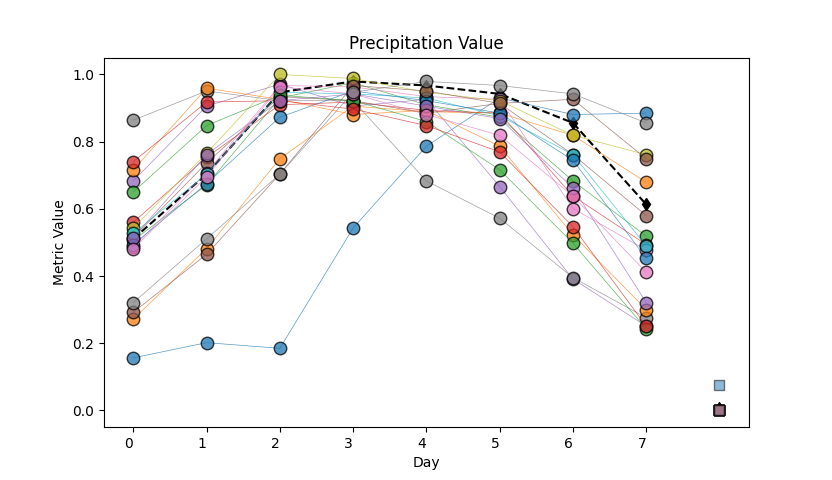
Plot rainfall predictions with line and scatter markers
p.visualize_pyplot(
   fmt = '-o',
   plot_params = {"linewidth": .5,"alpha": 0.75,"markersize": 9,"markeredgecolor": "black"},
   legend = False,
   scatter_params = {"s": 45, "alpha": 0.5,"edgecolors": "black","marker":"s"},
   title="Precipitation Value",
   xlabel="Day",
   ylabel="Metric Value"
)
Weather Forecasting
1. Import Necessary Libraries
Import modules and dependencies for weather forecasting
from cbr_fox.core import cbr_fox
from cbr_fox.builder import cbr_fox_builder
from cbr_fox.custom_distance import cci_distance
import numpy as np
import os
2. Load the Saved Data
Load preprocessed weather forecasting dataset
data = np.load(os.path.join(os.path.dirname(__file__), "weather_forecasting.npz"))
3. Retrieve Variables from the Data
Extract input features and target variables
training_windows = data['training_windows']
forecasted_window = data['forecasted_window']
target_training_windows = data['target_training_windows']
windowsLen = data['windowsLen'].item()
componentsLen = data['componentsLen'].item()
windowLen = data['windowLen'].item()
prediction = data['prediction']
4. Define CBR-FoX Techniques
Define CBR-FoX technique with CCI distance
techniques = [
    cbr_fox.cbr_fox(metric=cci_distance, kwargs={"punishedSumFactor": 0.5})
    # cbr_fox.cbr_fox(metric="edr"),
    # cbr_fox.cbr_fox(metric="dtw"),
    # cbr_fox.cbr_fox(metric="twe")
]
5. Build and Train the CBR-FoX Model
Train model using weather forecasting dataset
p = cbr_fox_builder(techniques)
p.fit(training_windows = training_windows,
      target_training_windows = target_training_windows,
      forecasted_window = forecasted_window)
6. Make Predictions
Generate predictions for weather data
p.predict(prediction = prediction, num_cases=3)
7. Visualize Results
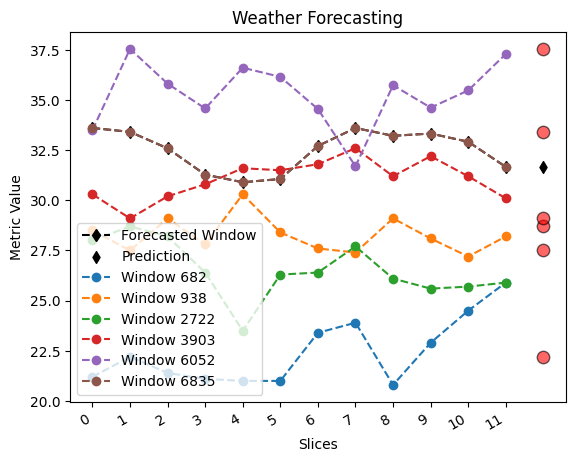
Visualize weather forecast results with custom scatter plot
p.visualize_pyplot(
    fmt = '--o',
    legend = True,
    scatter_params = {"s": 80, "c": "red", "alpha": 0.6, "edgecolors": "black"},
    xtick_rotation = 30,
    title="Weather Forecasting",
    xlabel="Slices",
    ylabel="Metric Value"
)
Power consumption Forecasting
1. Import Necessary Libraries
Import modules and dependencies
from cbr_fox.core import cbr_fox
from cbr_fox.builder import cbr_fox_builder
from cbr_fox.custom_distance import cci_distance
import numpy as np
import os
2. Load the Saved Data
Load preprocessed Power Consumption dataset
data = np.load(os.path.join(os.path.dirname(__file__), "Power_consumption.npz"))
3. Retrieve Variables from the Data
Extract input features and target variables
training_windows = data['training_windows']
forecasted_window = data['forecasted_window']
target_training_windows = data['target_training_windows']
windowsLen = data['windowsLen'].item()
componentsLen = data['componentsLen'].item()
windowLen = data['windowLen'].item()
prediction = data['prediction']
4. Define CBR-FoX Techniques
Define CBR-FoX technique with CCI distance
techniques = [
    cbr_fox.cbr_fox(metric=cci_distance, kwargs={"punishedSumFactor": 0.5})
]
5. Build and Train the CBR-FoX Model
Train model using Power Consumption dataset
p = cbr_fox_builder(techniques)
p.fit(training_windows = training_windows,
      target_training_windows = target_training_windows,
      forecasted_window = forecasted_window)
6. Make Predictions
Generate predictions for Power consumption data
p.predict(prediction = prediction, num_cases=3)
7. Visualize Results
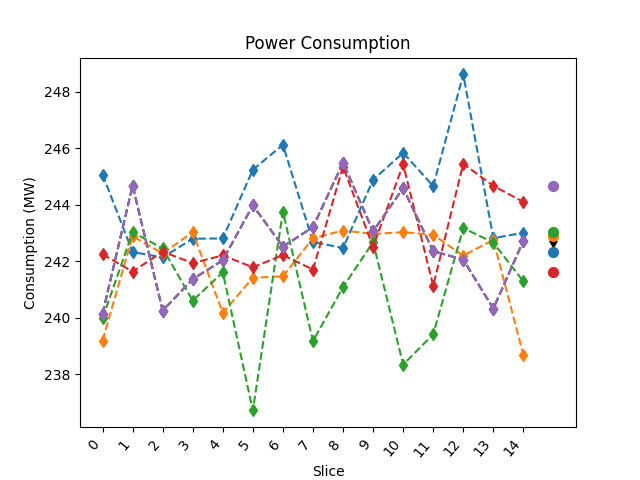
Visualize weather forecast results with custom scatter plot
p.visualize_pyplot(
   fmt = '--d',
   legend = False,
   scatter_params={"s": 50},
   xtick_rotation=50,
   title="Power Consumption",
   xlabel="Slice",
   ylabel="Consumption (MW)"
)
Fraud Detection
1. Import Necessary Libraries
Import modules and dependencies
from cbr_fox.core import cbr_fox
from cbr_fox.builder import cbr_fox_builder
from cbr_fox.custom_distance import cci_distance
import numpy as np
import os
2. Load the Saved Data
Load preprocessed Fraud Detection dataset
data = np.load(os.path.join(os.path.dirname(__file__), "Fraud_detection.npz"))
3. Retrieve Variables from the Data
Extract input features and target variables
training_windows = data['training_windows']
forecasted_window = data['forecasted_window']
target_training_windows = data['target_training_windows']
windowsLen = data['windowsLen'].item()
componentsLen = data['componentsLen'].item()
windowLen = data['windowLen'].item()
prediction = data['prediction']
4. Define CBR-FoX Techniques
Define CBR-FoX technique with CCI distance
techniques = [
    cbr_fox.cbr_fox(metric=cci_distance, kwargs={"punishedSumFactor": 0.6})
]
5. Build and Train the CBR-FoX Model
Train model using Fraud Detection dataset
p = cbr_fox_builder(techniques)
p.fit(training_windows = training_windows,
      target_training_windows = target_training_windows,
      forecasted_window = forecasted_window)
6. Make Predictions
Generate predictions for Fraud data
p.predict(prediction = prediction, num_cases=5)
7. Visualize Results
Visualize weather forecast results with custom scatter plot
p.visualize_pyplot(
   fmt = '--d',
   legend = False,
   scatter_params={"s": 50},
   xtick_rotation=50,
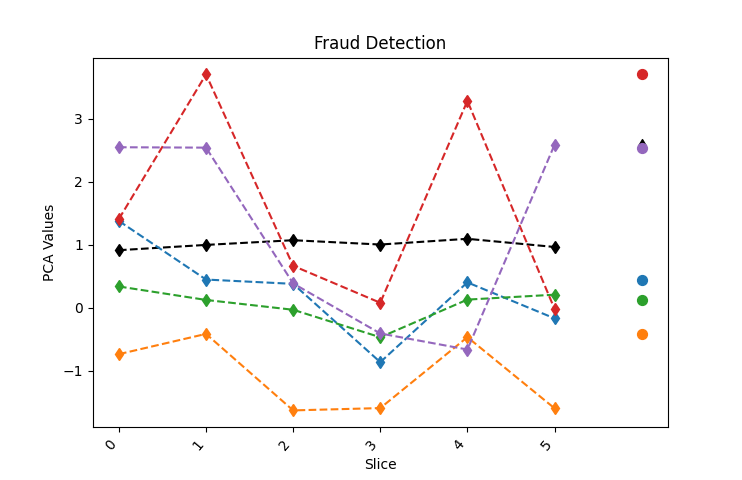
   title="Fraud Detection",
   xlabel="Slice",
   ylabel="PCA Values"
)